AI Agents for WordPress: What Helps and What Still Fails
A practical look at how AI agents inspect, change, and test WordPress—and why skills and MCP still need real evidence.
An AI model can explain WordPress. An AI agent can inspect a site, edit code, run commands, and test the result.
That difference matters.
The model does not become a WordPress engineer because it has a WordPress skill or an MCP connection. Those tools improve its reach. They do not prove its work.
A useful agent needs four things:
- clear instructions;
- access to the right system;
- tools that match the task;
- evidence that the result works.
Remove any one of them and confidence drops fast.

A reliable agent connects code, site state, user behavior, and test evidence.
How an AI Agent Works with WordPress
An agent works in a loop:
- It reads the goal and the rules.
- It inspects the code and the running site.
- It forms a hypothesis.
- It uses a tool to gather evidence or make a small change.
- It checks the result.
- It repeats until the evidence matches the goal.
The loop matters more than any single tool.
For a WordPress bug, the agent may start in a plugin file. It may then trace a hook into another plugin, read an option with WP-CLI, inspect an AJAX response, open the page in a browser, and run a focused test.
Each step changes what the agent knows. A good agent updates its plan. A weak agent protects its first guess.
Why WordPress Needs This Full Loop
A WordPress feature rarely lives in one file.
Its behavior can depend on:
- WordPress core and its hooks;
- the active plugin and theme versions;
- options, post meta, users, roles, and other database state;
- REST or AJAX requests;
- page-builder or block data;
- cached values and scheduled tasks;
- source JavaScript and the built file that ships to users;
- another plugin that changes the same hook or template.
The repository shows only part of the system. The database and browser show the rest.
This is why a code-only agent can produce a clean patch that fails on the real site. It may solve the logic it can see while missing the state that controls it.
What Each Agent Tool Adds
Skills provide the method
A skill is a reusable set of instructions and resources. OpenAI’s documentation describes skills as the workflow around tools: when to use them, in what order, and how to handle incomplete results.
A WordPress skill can tell the agent to trace hooks, check permissions, sanitize input, escape output, rebuild assets, and test supported versions. It can stop the agent from treating the first matching file as the whole system.
A skill cannot read a hidden option or click a live form. It guides the work. It does not supply the missing evidence.
Code and shell access expose the implementation
File access lets the agent search declarations, callers, templates, and tests. Shell access lets it run linters, builds, static analysis, and test suites.
This is where the agent learns what the code claims to do.
WP-CLI exposes site state
WP-CLI can show active plugins, versions, options, post meta, cron events, and other stored values. It can also execute WordPress-aware checks without opening the dashboard.
This is where the agent learns what the site is configured to do.
Write commands need care. I start with read-only access and expand it only when the task requires a controlled change.
The browser exposes user behavior
The browser shows the rendered DOM, network requests, JavaScript errors, validation messages, and the actual click path.
This is where the agent learns what the user experiences.
A passing PHP test cannot prove that a minified JavaScript bundle works. A browser check cannot prove that the server rejects a forged request. Strong verification covers both sides.
MCP exposes defined actions
MCP gives an agent a structured way to discover data and call actions.
WordPress 6.9 added the Abilities API. It lets WordPress components register named abilities with input schemas, output schemas, callbacks, and permission checks. The official WordPress MCP Adapter can expose selected abilities to MCP clients.
This creates a cleaner interface than scraping an admin page. It also supports narrow permissions.
But MCP only exposes what the site registers. The adapter keeps abilities private by default. The site must expose an ability, and the current user must have permission to run it.
If a plugin does not expose its pricing rule, MCP cannot invent that tool. The agent still needs code access, WP-CLI, a browser, or a purpose-built ability.
A Real WordPress Test
I used a Tourfic booking bug as a field test.
A group package allowed eight travelers, but the booking form stopped at two adults. The limit was dynamic, so the investigation focused on where its value changed across the booking flow.
The agent traced the value through stored settings, rendered HTML, the booking popup, frontend JavaScript, and server validation. Those paths did not apply the same rule.
The booking flow had two separate limits:
Adult + Child + Infant <= Package Max
Adult + Child <= Remaining schedule capacity
The package allowed eight travelers in one booking. The schedule still had 20 Adult/Child seats across all bookings. One number did not replace the other.
The fix created one package-limit rule for the booking paths and made the popup return the current limit. The source JavaScript and production bundles changed together.
Then the agent tested the contract, not only the changed lines.
On September 24, 2026:
- 31 regression scripts passed;
- 8 security regression scripts passed;
- changed PHP and JavaScript files passed syntax checks;
- the production asset build passed;
- the browser accepted eight travelers and stopped there;
- the server accepted eight and rejected nine;
- schedule capacity remained 20.
No booking was submitted. The test did not prove payment, order creation, or post-booking inventory changes. That limit belongs in the result, not in a footnote.
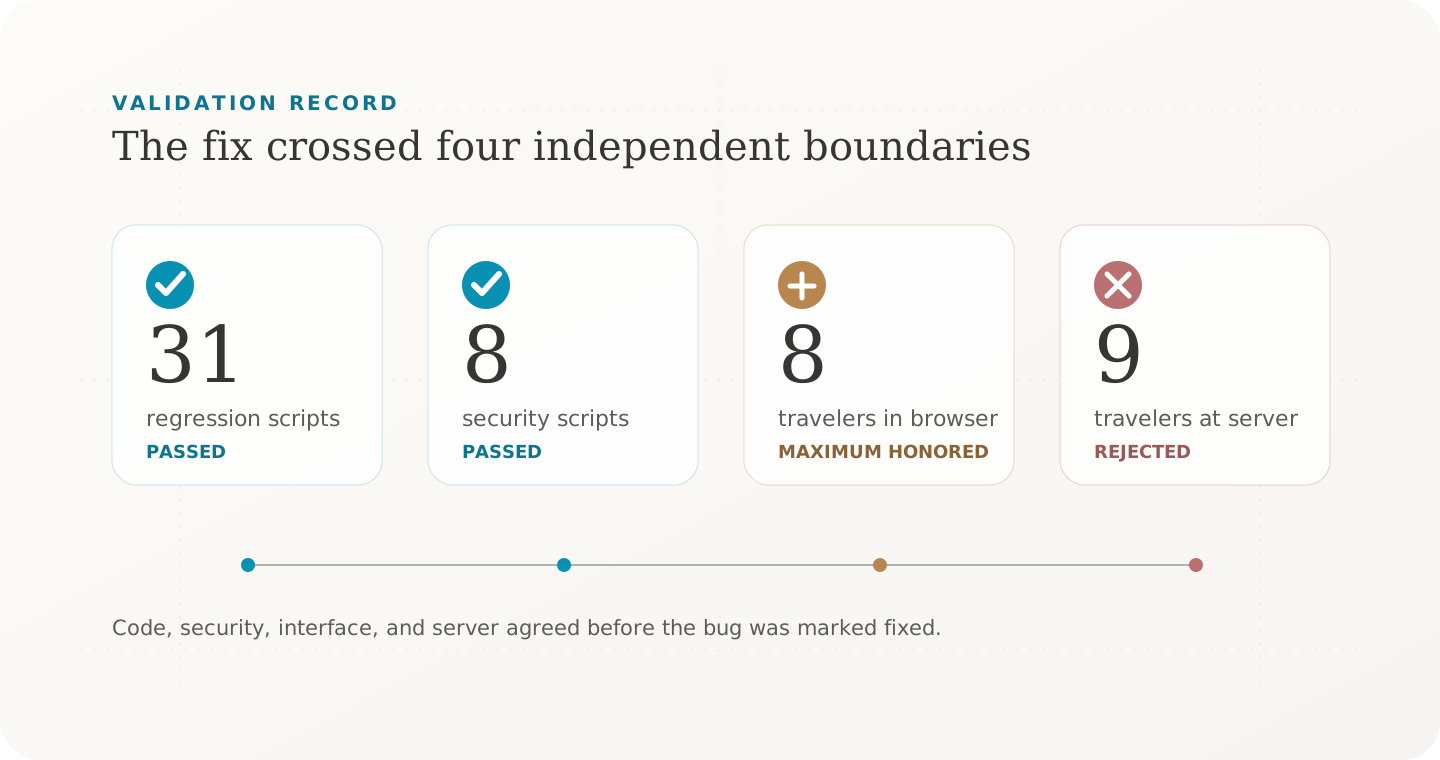
The evidence proved the booking limit. It did not prove the complete purchase flow.
This is one field report, not a benchmark. Its value comes from the visible chain between the rule, the change, and the tests.
What Helps
AI agents work well when the task has a clear contract and fast feedback.
They can:
- trace a request across PHP, JavaScript, templates, and hooks;
- compare repeated implementations of the same rule;
- add focused regression tests;
- rebuild shipped assets;
- test valid and invalid inputs;
- summarize changed files, evidence, and remaining risk.
WordPress Playground also helps. It gives the agent a clean environment for repeatable tests. The official guides cover PHPUnit with the Playground CLI and browser tests with Playwright.
Playground is useful for isolation. A staging copy is stronger when the bug depends on real content, plugin combinations, or old saved data.
What Still Fails
Skills, MCP, and browser tools do not remove the common failure modes.
An agent can still fail when:
- the goal does not define correct behavior;
- it cannot inspect the active versions or saved data;
- it changes generated code but not its source;
- it tests only the happy path;
- it treats a nonce as authorization;
- it trusts a test count without checking the cases;
- it skips another plugin or theme that consumes the same contract;
- it reports success without naming what it did not test.
More access can make these mistakes faster. It does not make them less likely.
How I Set Up a WordPress Agent
I give the agent a narrow, testable task. I also provide:
- repository instructions and WordPress-specific skills;
- the supported WordPress, PHP, and plugin versions;
- read access to relevant site state;
- the exact reproduction steps;
- the expected valid and invalid cases;
- the build and test commands;
- a safe staging environment for browser checks;
- clear approval boundaries for writes, bookings, payments, and deployment.
I ask it to work from evidence. First inspect. Then explain the root cause. Then change the smallest surface. Then test the contract at every boundary.
What “Done” Should Mean
Before I accept an agent’s WordPress work, I want a short report with:
- the root cause;
- the rule the system must enforce;
- the files and components involved;
- the valid and invalid cases tested;
- the automated and browser checks that passed;
- the important paths that remain untested;
- the commit, push, and deployment state.
That report is more useful than “fixed” or “all tests passed.” It lets another engineer challenge the evidence.
AI agents can work well with WordPress. Skills give them a method. MCP gives them defined actions. WP-CLI reveals site state. The browser reveals user behavior. Tests turn claims into evidence.
The agent is strongest when these parts work together. It still needs a clear contract, limited access, and a human who knows what proof looks like.