TurtleReport is a WordPress plugin for SEO agencies. It brings each client’s Search Console, GA4 and, optionally, Google Business Profile data into one dashboard, flags the changes worth acting on, and sends branded reports on a schedule. I designed and built it on my own, from the engineering decisions to the interface and the words in it.
Agencies repeat the same monthly routine: open each client’s Search Console, then GA4, compare with last month, paste numbers into a report. The useful part, noticing that a key page lost its rankings or a contact form stopped recording leads, gets buried under the copying.
Issues that say what to check
The daily monitor doesn’t stop at “traffic dropped”. An issue shows the two periods compared, the before and after numbers, what the data suggests and the checks worth running first. If organic visits held steady but leads fell, it says so, and points at the form or the tracking rather than at SEO. When a whole site’s clicks drop, the pages and keywords behind it become evidence in that one issue rather than separate alerts. Page and keyword alerts appear on their own only when the site as a whole held up, which is exactly when they’re easy to miss.
Where the data lives
TurtleReport runs inside the agency’s own WordPress and connects with the agency’s own Google Cloud credentials. There’s no TurtleReport server in between. The optional AI Advisor and Slack sharing do send data out, to the provider the agency picks, and only when someone uses them.
Architecture: a plain WordPress plugin, on purpose
TurtleReport is a normal WordPress plugin, and I kept it that way. One composition root, src/Plugin.php, builds every service explicitly and hands each one what it needs. There’s no container, no custom router and no service locator. Every REST request constructs the report, monitor and advisor services to register its routes, so those constructors stay cheap and never touch the network. A boundary check (composer check:boundaries) fails if a module imports something it isn’t allowed to: shared helpers can’t depend on product code, and services can’t depend on admin screens.
Requests come in through admin forms and REST routes, and each one checks three things separately: who you are, whether your role has the capability, and whether you can see that particular client. A valid nonce proves intent, not permission.
Storage stays inside WordPress. Settings and client profiles live in options, report runs and recipient attempts in two custom tables, and access grants in user meta. Before the plugin trusts those tables it checks their columns and unique keys, and only then records that setup succeeded, so a normal page load never runs a schema change. Google credentials are encrypted with libsodium’s secretbox. The key is derived from WordPress’s AUTH salts, which normally live in wp-config.php, or from a dedicated TURTLEREPORT_ENCRYPTION_KEY constant that keeps it out of the database entirely. The cost is that changing either one means reconnecting Google.
A report is built once into a stored snapshot. The email, the server-side PDF and the share link all read that snapshot, which is why their numbers can’t disagree. The rule I guarded most closely sits here too. Small clients often have no Business Profile, no conversions set up or too little traffic for a query report, so a section Google has no data for stays absent and a real zero stays zero. Neither blocks the report. Only sign-in, permission, network and malformed-response failures count as errors.
The admin is a hybrid, deliberately. React, loaded from WordPress’s own copy rather than bundled again, runs the parts that update in place: the monitor, the Advisor and the report summaries. Settings stay native PHP forms, which remain the source of truth, and no screen has needed a global state library. Each frontend feature owns its API calls, state and tests, and a check stops one feature importing another’s internals.
Why not an MVC framework
A Laravel-like MVC framework on top of WordPress is a legitimate choice. It gives a codebase one shared structure, makes features quicker to build because the conventions are already decided, and keeps the code readable for whoever works on it next. I wanted all of that. I chose to get it another way, for three reasons.
Plugins share one PHP process. If two plugins bundle different versions of the same library, whichever loads first wins and the other breaks, and the bug depends on plugin load order on someone else’s site. A bundled framework is exactly that kind of library. TurtleReport ships no runtime Composer packages: the only thing in vendor/ is Composer’s autoloader, and even the server-side PDF is written by the plugin’s own code.
I also wanted every request to pass through WordPress’s own boundary. Routes are registered with the REST API, so each one keeps Core’s permission callback and nonce handling, and admin forms go through WordPress’s own handlers. WordPress developers and plugin reviewers already know how to read and audit those.
The third reason is how code gets written now. Much of it is written or changed by AI agents, so a codebase has to be easy for an agent to read correctly, not only for a person. An ORM gives flexible lookups, but it adds a layer. A model call is often shorter than the SQL it produces, yet what it does depends on models, relationships and conventions defined elsewhere, so an agent has to load more of the codebase and the framework, and spend more tokens, before it can be sure what a query touches. In TurtleReport, every direct SQL query lives in 4 of the 119 PHP files in src/, next to the schema it uses.
So the structure comes from conventions rather than a framework: one composition root, request handling in the admin and REST modules, persistence in its own modules, and a dependency map the boundary check enforces. That check, and a matching one for frontend imports, fails any change that crosses a module line, whoever or whatever wrote it. The trade-off is that I maintain those conventions myself.
The other costs are concrete. Without an ORM there’s no query builder, so a new lookup means a new explicit query. Values go through prepare() or are cast to integers, table names come from one schema class, and updatable columns are checked against a fixed list. Because table names and integer lists are interpolated rather than passed as placeholders, WordPress.org’s Plugin Check reports 20 warnings, and I review the same list on every release. The boundary check only sees classes named explicitly in code, not dynamic lookups or callbacks. And there’s no isolated PHP unit-test suite: every backend check runs inside a real WordPress with its own MySQL, which tests what actually ships but takes minutes rather than seconds.
What I chose not to build
The architecture notes also record what’s missing on purpose. There’s no provider-neutral data layer, because Google is the only source. There’s no shared framework for future plugins, because one product isn’t evidence that a second will need the same code. The notes also say what would justify adding them, such as a real second consumer or a measured performance need.
Scheduling without double sends
Scheduled reports and weekly summaries run from an hourly background job that sweeps every client. The failure I designed against is a duplicate: a client getting the same report twice because two processes overlapped or one died halfway.
Each recipient is claimed with a conditional UPDATE before any mail goes to them, so if two processes reach the same report, only one sends to each person, and a retry never emails someone whose message was already accepted. Claims are stamped with the real clock rather than the moment the sweep started, so a sweep that began long ago can’t mistake a message being sent right now for an abandoned one. One client failing doesn’t stop the others, and each client’s lock is released in a finally block. Deleting a report run checks that it isn’t busy inside the same DELETE statement, so there’s no gap between the check and the delete.
The weekly summary for the agency claims its slot before sending. If sending throws partway, the result is recorded as unknown rather than failed, because some of its emails may already have been accepted. If the process dies outright, the stale attempted record is flagged as interrupted. Either way it isn’t retried automatically, since a blind retry is how someone gets the same email twice.
Words that match what happened
I went through the copy in the admin, the PDFs and the emails, and rewrote whatever claimed more than the code knew. “Test message sent” became “Slack accepted the test message”. “The report was sent now” became “the report was handed to the mail system”, because a mail server accepting a message doesn’t prove it reached an inbox. AI Advisor answers are labelled as suggestions. An empty list and a filter with no matches now say different things.
The last ten percent of the interface
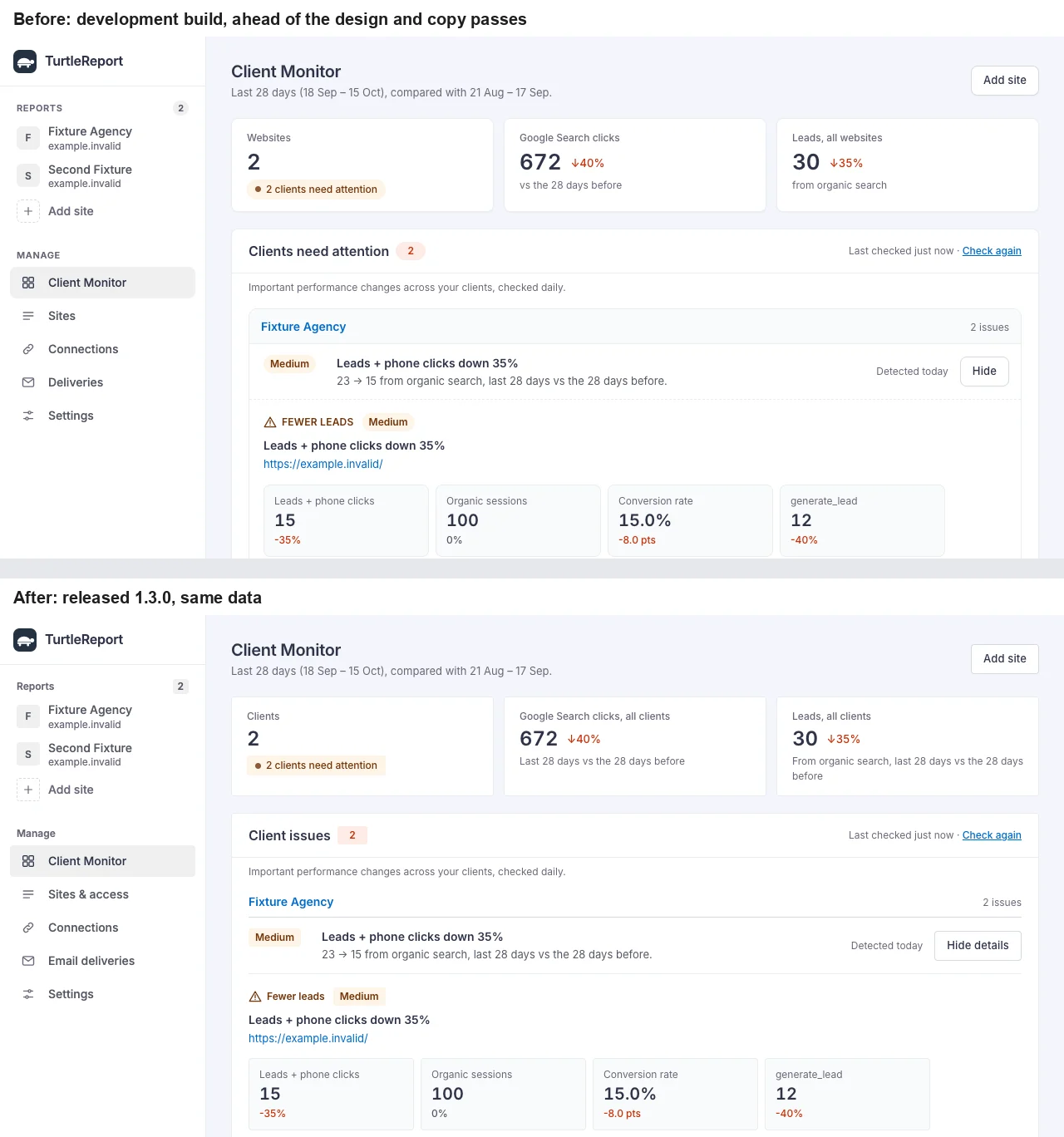
The early version worked. What it lacked was consistency, the kind of small drift that makes software feel unfinished: capitalised labels next to sentence-case ones, a client box nested inside a panel, a rounded “Ask AI” pill among square buttons, and “Deliveries” in one menu but “E-mail deliveries” in the other. I flattened the nesting, put corners and type sizes on one scale, gave each screen one name in both menus and made the numbers say which period they cover.
One fix taught me to respect WordPress’s own layout. I first fixed the whole content area in place so reports could scroll beside the menus, which trapped the admin bar underneath the side menu. Now only the scrolling pane is fixed.
What the tests prove, and what they don’t
Each release now runs 299 backend checks against a throwaway WordPress on the oldest setup I support (PHP 7.4, WordPress 6.3) and the newest (PHP 8.5, WordPress 7.1.3), plus WordPress.org’s Plugin Check. Upgrading from the first release is part of the run, and it checks that existing access grants still work and stored credentials still decrypt. Before 1.2.0, a separate review found thirteen issues, and all of them were fixed before release.
One multisite check exists because of a real bug that shipped in 1.0. The overview screen, now the Client Monitor, cached its list of clients in a static variable for the whole request. When code switched to another site mid-request, as network-level code does, the overview could still list the previous site’s clients. In a product built around keeping clients apart, that’s the wrong kind of bug. Since 1.2.0 the cache is kept per site, and a test switches sites mid-request and checks that each site sees only its own clients.
Google, Slack and the AI providers are simulated in those tests, and inbox delivery isn’t tested end to end. Throughput is unmeasured too: report data loads overnight in background jobs, and I haven’t benchmarked how many clients one site can carry before that becomes a constraint. The checks prove the plugin’s behaviour, not the services around it or its limits at scale.